Collecting user feedback
I love simple basic things that come together to deliver a feature.
I am working on a new product around guided meditation. I am learning what makes a good meditation session and applying it to create lot of sessions on the fly (shoutout to ffmpeg, it rocks). While the hardware is coming together at its own pace and has its own challenges (maybe I will write a separate post around it), I wanted a quick way to share these sessions with the right people and collect their comments and feedback.
My requirements were clear: clean UX that allows users to tell us their name and what they thought of the session. For users, I didn't want them to create account, authenticate etc. For backend, I didn't want to over-engineer it. A central place where I can see all the comments, a notification when I get a new feedback.
Enter: Google Forms. Here are the steps I did:
- created a google form with the questions
- published it and got the public URL
- I used a tool to get "
entries" that represented my questions in the form - build a modal, custom UI that was consistent with my app (<iframe>
embedding was not needed):
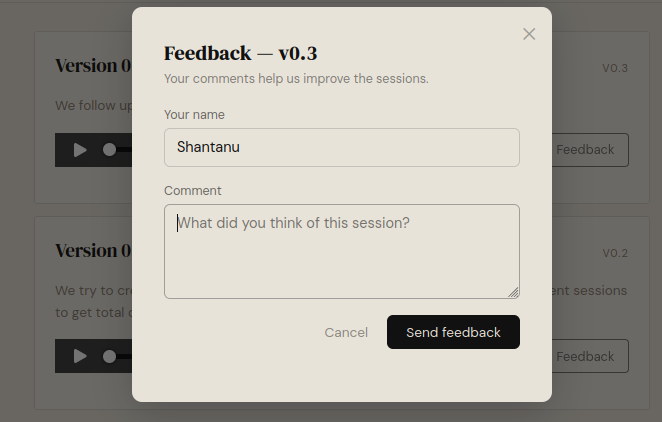
-
A POST (on backend using python
requestsor from javascript using afetchcall) request with all entries (questions) and their values. That's it. Response is registered, a new line is added to the linked spreadsheetconst GOOGLE_FORM_URL = 'https://docs.google.com/forms/d/<formID>/formResponse'; const ENTRY = { name: 'entry.1122112211', comment: 'entry.7766177172', segments: 'entry.1121121218', version: 'entry.178019201', }; const formData = new FormData(); formData.append(ENTRY.name, name); formData.append(ENTRY.comment, comment); formData.append(ENTRY.segments, segments); formData.append(ENTRY.version, modal.dataset.version); try { await fetch(GOOGLE_FORM_URL, { method: 'POST', mode: 'no-cors', // Google Forms doesn't allow CORS; submission still works body: formData, }); - I enabled email notification for new responses

When I first read about it from Claude and Stackoverflow I didn't
believe it. In the past whenever I have tried to use google products,
it was a pain, setting up authentication, configuration, permissions
etc, it was always a PAIN. I thought Google would never allow a simple
POST to register a response. But they do. Whenever a user leaves a
comment, I get an email alert, I get neat breakdown of all the
feedback on google forms response section
It is such a joy to stumble across this solution that just works. Plus, I was casually talking about it with Punch, it was TIL for him too, he loved it too and that also made me happy 😊.